Laptop Stand vs Monitor Arm: Which Cleans Up a Small Desk Better?
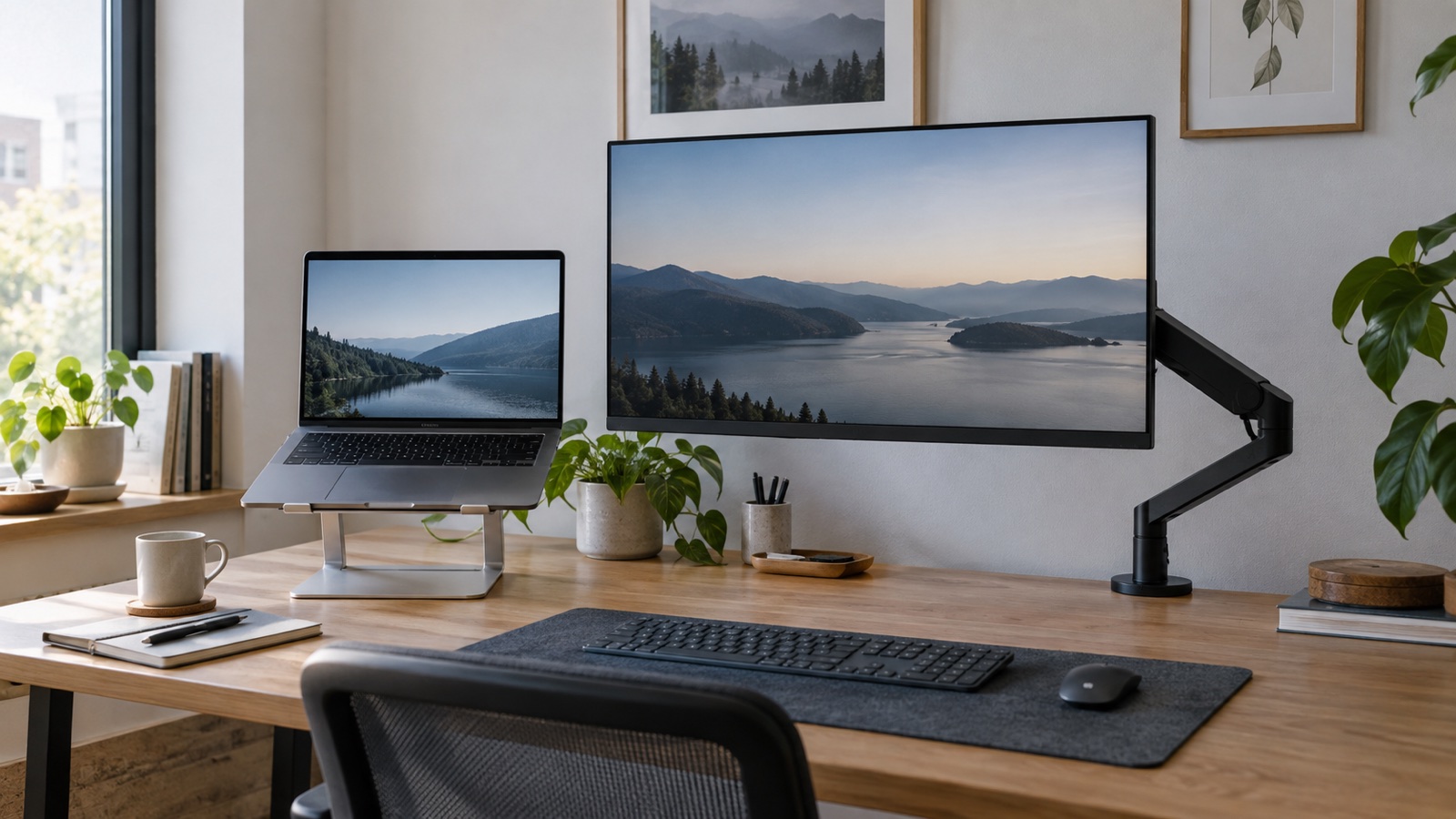
A laptop stand is the quick, portable fix. A monitor arm creates more usable desk space but asks for a compatible display, a solid mounting edge, and more setup work.
How this article was prepared
This article is based on comparative research, published product documentation, pricing review, and practical workflow analysis. We do not claim hands-on testing unless the article explicitly says so.
Read the editorial policyA laptop stand and a monitor arm can both lift a screen to a more comfortable height, but they solve different versions of the same problem. The stand improves a laptop-first workspace. The arm is designed around an external display and a desk that can support permanent hardware.
The better choice is not the one that looks cleaner in a setup photo. It is the one that fits the computer you actually use, the depth of the desk, and how often the workspace needs to move.
The quick decision
Choose a laptop stand when the laptop remains your main screen, the desk doubles as another surface, or you regularly pack the setup away. Choose a monitor arm when an external monitor is the main screen and reclaiming the area under its stand would make the desk noticeably easier to use.
If you are still deciding whether an external screen belongs in the setup, start with our external monitor guide before buying mounting hardware.
Where a laptop stand wins
A stand is simple. It raises the computer, improves the camera angle, and can create a small storage area underneath. Folding models travel well, and a fixed stand can make a permanent desk feel more organized without drilling or clamping anything.
The tradeoff is input comfort. Once the laptop is raised, its keyboard and trackpad are usually too high for long sessions. Plan on using an external keyboard and mouse. The stand also keeps the laptop screen relatively close, so it does not create as much visual distance as an arm-mounted monitor.
Check these details before buying:
- The stand should hold the laptop without wobbling while you type nearby.
- The contact points should not block intake or exhaust vents.
- The base should fit without pushing the keyboard too close to the desk edge.
- The adjustment mechanism should stay locked under the laptop's weight.
Where a monitor arm wins
A monitor arm removes the original stand from the work surface. That can free a surprising amount of depth for a notebook, speakers, or a dock. It also makes it easier to set the screen height and distance independently.
An arm needs more preparation. The monitor must have a compatible mounting pattern, the arm must support its weight, and the desk edge or cable opening must accept the clamp or grommet. Thin hollow desktops and glass surfaces may need reinforcement or may not be suitable at all.
Movement is not automatically a benefit. If the screen bounces while typing, slowly droops, or requires two hands to reposition, the arm has added friction instead of removing it.
Measure the space the hardware will occupy
For a stand, measure the base as well as the laptop. Some folding stands have small feet, while fixed models can consume most of the area behind a keyboard. Leave room for the charging cable to exit without a sharp bend.
For an arm, inspect the space behind the desk. A monitor can sit close to a wall only if the arm folds sideways rather than projecting backward. Also check drawers, support rails, and decorative lips under the desktop before assuming a clamp will fit.
Think about the whole input setup
Either option works best when the screen, keyboard, and pointing device can be positioned separately. Keep the top part of the display near a comfortable eye line, then place the keyboard where the shoulders stay relaxed and the wrists remain neutral.
If the external display also provides laptop charging and ports, the monitor-arm route can become a clean one-cable setup. If not, a dock or USB-C hub may still need a permanent place on the desk.
Which one should you buy first?
Start with a laptop stand if you need an inexpensive, reversible improvement or work in more than one place. It reveals whether raising the screen helps before you commit to a monitor and arm.
Choose the monitor arm when you already use an external display daily, the original stand occupies valuable depth, and the desk can safely support a clamp. The arm is the stronger space-saving tool, but only after compatibility is confirmed.
The practical verdict
For a laptop-first desk, the stand is the cleaner and lower-risk purchase. For a settled external-monitor workstation, an arm provides more control and frees more surface area. Measure the mounting area before buying either one, and include the keyboard, cables, and dock in the decision rather than treating screen height as an isolated problem.